Build Your Personal Avatar and Performance Library
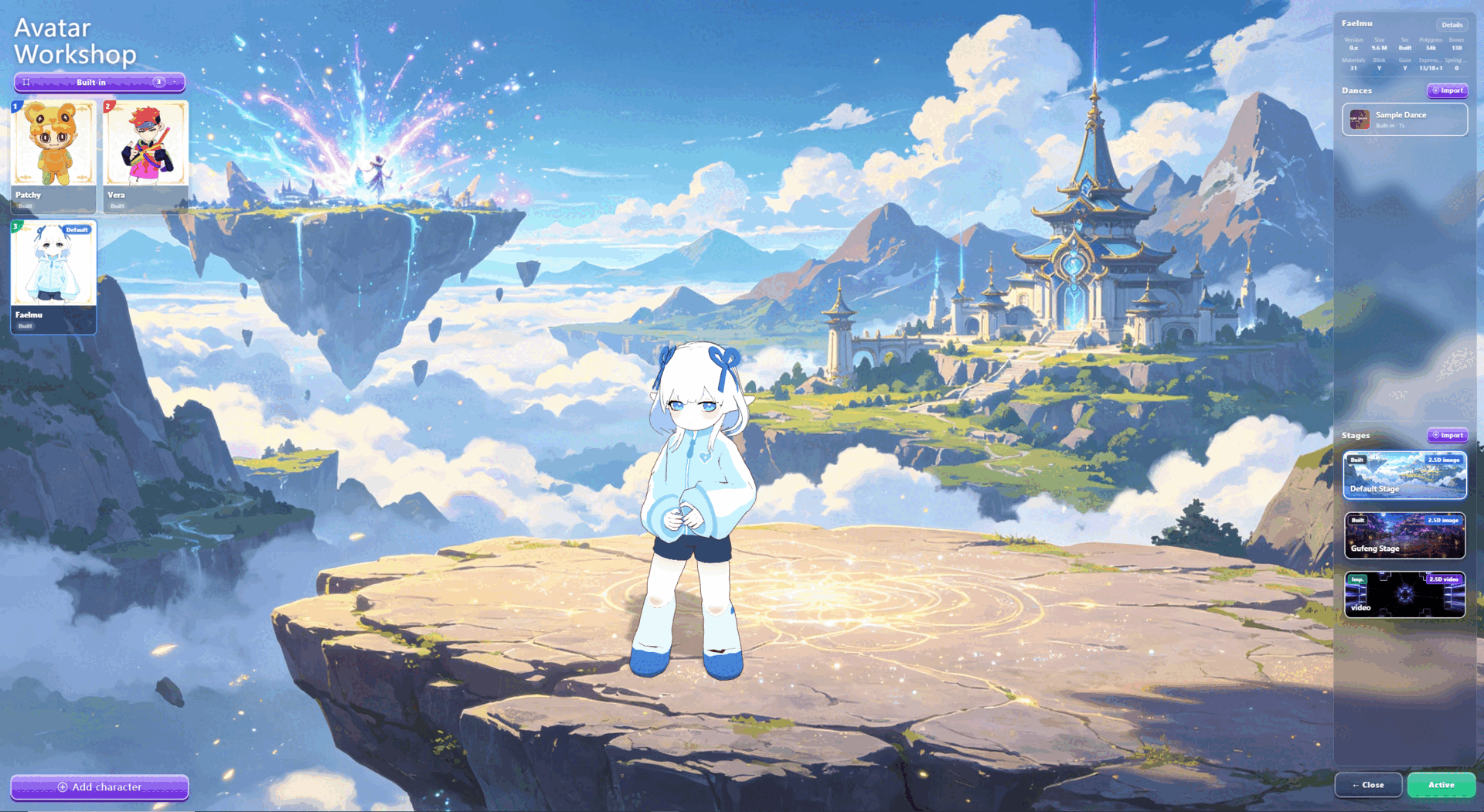
AniMate Workshop is where your VRM avatars, motions, dances, and stages become a reusable desktop performance library. Start with built-in characters, then unlock custom imports when you are ready to make the setup truly yours.
The core idea
A desktop companion becomes more valuable when it stops being a single cute character and starts becoming your own reusable library. AniMate Workshop is built around that shift: one place for avatars, one place for motions and dances, and one place to shape the stage or desktop scene around them.
What belongs in the library?
Workshop is not only a menu. It is the part of AniMate that turns separate files into a repeatable desktop performance workflow.
Avatars
Built-in characters, your own VRM avatars, VRoid exports, creator models, or downloaded VRM files with clear usage terms.
Motions
Idle motions, reactions, pose loops, and smaller movement clips that make a character feel present during everyday desktop use.
Dances
Longer performance motions that can be tested across different compatible avatars for music, recording, and visual demos.
Stages
Desktop backgrounds, simple stage setups, or visual contexts that make the avatar feel placed instead of pasted onto the screen.
One dance. Different avatars.
The fastest way to understand AniMate Workshop is to watch the same dance move across multiple characters. A dance should not feel trapped inside one model. It should become a reusable performance asset that you can test with the avatars you care about.
Keep the dance separate
Treat the dance as its own asset, not as a one-off effect tied to a single avatar.
Test compatible avatars
Try the same motion on avatars with different proportions, hair, sleeves, and accessories.
Save stable matches
Keep the combinations that look readable, expressive, and comfortable on your desktop.
Use the right context
Switch between quiet desktop use, music sessions, recording, and performance-style scenes.
Turn the desktop into a small stage
A good desktop performance setup is not about filling the screen with effects. It is about making the avatar, dance, desktop background, and stage context work together while the desktop still feels usable.
- Choose a readable avatar: clear silhouette, stable bones, limited accessories, and clothing that does not hide the movement.
- Pick a dance that matches the model: test short loops before full dances, especially with long hair, skirts, sleeves, or physics-heavy models.
- Keep the stage clean: place the avatar away from dense icons, busy wallpaper areas, and frequently used windows.
- Reuse what works: once an avatar, dance, and stage combination feels good, keep it as a repeatable Workshop setup.
| Stage type | Best for | What to avoid |
|---|---|---|
| Everyday desktop | Work, study, chat, and long-running companion use. | Busy wallpapers, dense icon areas, and constant large dance loops. |
| Music mode | Listening sessions where the avatar can move with more energy. | Motion that hides the face or repeatedly crosses important windows. |
| Recording setup | Short clips, demos, and social posts where the desktop scene is the subject. | Unlicensed models, unclear usage rights, or cluttered UI in the recording area. |
How the workflow feels
| Step | What the user does | What to check before moving on |
|---|---|---|
| Start free | Try built-in characters, desktop presence, mouse interaction, and music reactivity. | The avatar is visible without covering the taskbar, icons, or active windows. |
| Open Workshop | Browse the avatar, motion, dance, and stage areas. | Avatar, motion, dance, and stage choices are easy to find again later. |
| Test a dance | Apply one dance to one avatar, then try it with another compatible avatar. | The motion looks stable on the selected avatar before you save it as a favorite setup. |
| Build a setup | Combine avatar, dance, and stage into a repeatable desktop scene. | The final scene matches the situation: quiet companion, music mode, or recording setup. |
Free vs Full Version
AniMate should be easy to understand before anyone pays. The free experience lets you test whether a desktop companion fits your daily desktop. Full Version matters when you want the library to become yours.
- Free: try built-in characters, desktop presence, interaction, music reactivity, and Workshop settings.
- Full Version: import your own VRM models, motions, dances, and stages, then reuse them in Workshop.
- One-time license: unlock custom imports once for $9.90.
A practical setup checklist
Workshop becomes most useful when you keep fewer, better-tested combinations instead of collecting files you never use. Before saving a setup, check the whole desktop experience.
1. Avatar readability
Make sure the face, body shape, and important motion details are still readable at the desktop size you actually use.
Keep it if: the character feels present without needing to sit in the center of the screen.
2. Motion stability
Test hair, sleeves, skirt, accessories, and hand positions during the largest part of the motion or dance.
Keep it if: clipping is minor enough that it does not distract during normal viewing.
3. Desktop comfort
Place the avatar where it can stay for a while without blocking your actual work, chat, browser, or taskbar.
Keep it if: you can forget the setup is running until you want to interact with it.
4. Usage rights
Check the model, motion, dance, music, and stage terms before recording, streaming, publishing, or using the setup commercially.
Keep it if: the planned use matches the creator or platform rules you found.
FAQ
Is Workshop only for dancing?
No. Dance is the easiest visual example, but the larger value is organizing avatars, motions, dances, and stages into a reusable library.
Can every VRM model dance perfectly?
No. Compatibility depends on the model. Lightweight avatars with clean bones, fewer accessories, shorter hair, and less complex clothing usually behave better during larger dance motions.
Can I import my own avatar, motion, dance, or stage?
Custom imports are part of the Full Version. The free version is still useful for trying the core desktop companion experience before deciding whether custom imports are worth unlocking.
Is this useful if I only want a quiet desktop companion?
Yes. A performance library does not mean the avatar has to dance all day. You can keep gentle idle motions for work and switch to dances or stage setups when recording, listening to music, or showing your desktop.
Start with built-in characters. Unlock your own library when ready.
Download AniMate for Windows, try the desktop companion experience, then upgrade once to import your own VRM avatars, motions, dances, and stages.